Sync is the foundation of editing, yet the post-production workflow often suffers because camera operators (and even editors!) don’t know enough about that basic tool, timecode (or TC).
April 2012. I’m in New York for a live multicam event shoot, with a small crew and a decent but low-profile budget: a Franco-American “indie” coproduction, so to speak, with French department heads and American operators and technicians.
During a conversation in prep, as we were leaving the location, the young New York assistant editor working on the project ended up saying to me: “You’re always talking about timecode, but what’s it actually for?” I stop, I look at him, and I can’t help being a smart aleck: “Wait, you cut multicam all day long and you don’t know what timecode is for?” As it turned out, he was systematically syncing his footage by eye and by ear!
To me, this anecdote neatly illustrates the blind spot in the audiovisual production workflow: timecode.
Incidentally, I don’t talk about timecode “all the time,” OK… But today, I will!
What is timecode?
A quick refresher: timecode gives each recorded frame an “address” in the form Hours/Minutes/Seconds/Frames, i.e., HH:MM:SS:FF, for example 10:37:28:05. When shooting at 25 fps, after 25 frames the seconds counter increments and the frame counter goes back to zero, runs from 0 to 24 again, and so on…
To sync picture and sound precisely, the camera(s) and the sound recording systems obviously have to run at the same frame rate, and be set to the same timecode.
Timecode became indispensable given the precision demands of professional video. It was standardized in 1969 by SMPTE (Society of Motion Picture and Television Engineers) for the NTSC format (the Americas, except for a few Latin American and Caribbean countries, plus Japan, roughly speaking), then by the EBU in 1972 for the PAL format. As a reminder, this NTSC/PAL split, apart from a few regional quirks, depends on the electrical frequencies each country chose or inherited from history, which affects the frame rates we use to avoid flicker problems: 25 fps at 1/50 s (180° shutter angle) in the PAL world (50 Hz mains), vs. 30 fps at 1/60 s (180° shutter angle) in the NTSC world (60 Hz mains).
Note that by adjusting the shutter speed, you can work around this technical constraint and shoot at 25 fps in the United States or Japan, or at 24 fps in Europe, but that’s another story…
Timecode isn’t the only identifier that gives each frame its unique address: there is also the clip ID (letter + number) and the reel/tape/card ID (letter + number). But while clip and card names can easily be changed manually on a computer, timecode is an integral part of the clip, just like the picture and sound recorded at the time of shooting. It is probably the most important piece of metadata the camera generates while recording.
Each recorded frame thus has a unique “address,” which means that in post-production the footage carries unique time-stamp identifiers, so you can find your way around it during editing, and later during the conform, when the lower-quality files (compressed so they can be handled quickly during editing) are replaced with the full-quality, full-resolution files for the final assembly (and for the grade, among other things!).
In the days of film, editors relied on edge numbers: the numbers printed along the edge of the print stock allowed them to conform the negative frame-accurately once editing was finished. The process was later automated with Kodak’s Keykode, which is still in use today. When editing films shot on film, each frame is identified by a Keykode, and by a timecode.
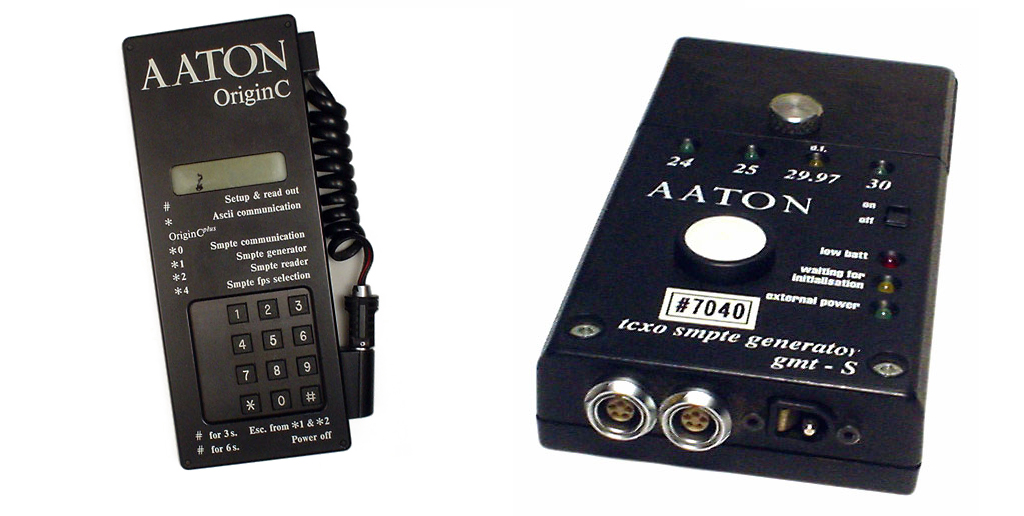
Special mention must go here to Aaton, the French company founded by the late engineer Jean-Pierre Beauviala, who did a great deal for picture and sound sync, building exceptional cameras (Beauviala, then working for Éclair, introduced crystal sync on the Éclair Coutant and ACL cameras as early as the late 1960s) as well as equally exceptional sound recorders (the Cantar). Aaton naturally designed picture/sound sync boxes, and even a dedicated code to identify each frame exposed on the film: AatonCode.
Timecode on set
Timecode, then, is a valuable tool that lets our images travel from our cameras to the very last post-production steps without getting lost, in a process that sometimes takes several years, with all the hazards film production is always prone to.
So if it’s so important, who is in charge of setting and generating timecode? The cinematographer? The camera assistant? The sound team? And following what guidelines? What if we’re shooting with stills cameras? What if we’re shooting with several cameras?
Even though cameras can generate their own timecode, timecode is generally handled by the sound team, whose equipment generates very precise timecode, accurate to the microsecond rather than to the 24th or 25th of a second. This timecode is distributed to the camera through standalone “slave” boxes, “jammed,” so to speak, to a “master” box, namely the internal clock of the main audio recorder. The clock simply runs, and the cameras, set up to receive this external timecode, record frames according to the clock time, in hours/minutes/seconds/frames.
Everything is perfectly in sync. That’s the best-case scenario.
And then there are all the other cases.
You can always clap your hands to give a sync point for realigning picture and sound, at the cost of some handling time for the assistant editor; but still, let’s try to be a little rigorous whenever possible.
If there’s no sound team and you’re shooting with two cameras (or more), and the cameras have timecode inputs, set the timecode to “Free Run” (continuous time-of-day running), designate a “master” camera and a “slave” camera, and shoot with a cable linking the two. For example.
If you can’t link the cameras with a cable, you’ll need several timecode boxes, one “master” and the other(s) “slave,” each connected to a camera’s timecode input.
If the cameras have no timecode input (typically the case with stills cameras), the timecode generators can be plugged into one of the audio inputs of the camera or DSLR body, recording the timecode as audio (LTC). You then need to check that the timecode box’s output level is set correctly (roughly, line level or mic level, or even somewhere in between!).
As a last resort, I have even shot an entire film by filming the timecode displayed on the box at the start and/or end of each shot! The box was jammed every half day by the production sound mixer…
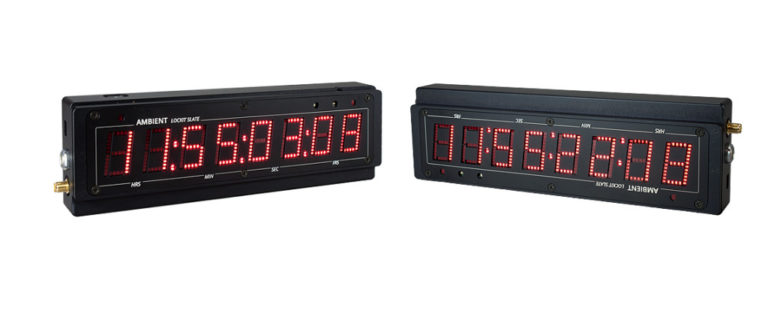
You can also film a smart slate held up at the start of each take, or placed somewhere outside the action, displaying the timecode synced by the sound team.
So there are solutions: Ambient, Timecode Systems, and Tentacle design and sell sturdy, reliable boxes suited to different uses. Among the least expensive are the Tentacle Sync E and the UltraSync BLUE, which can be jammed remotely via Bluetooth!
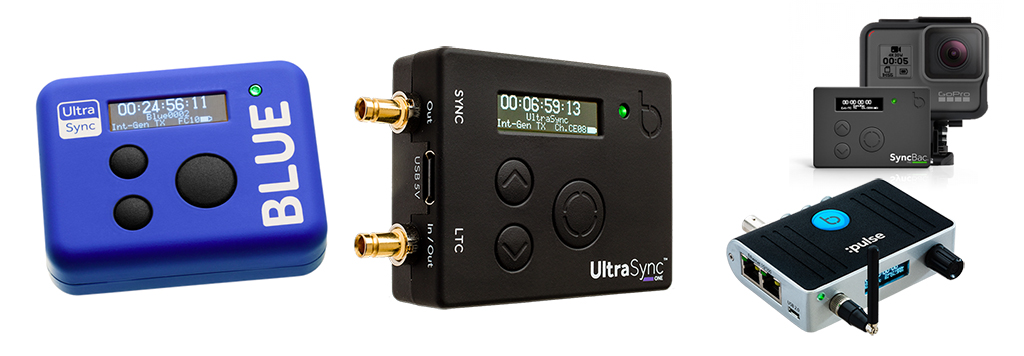
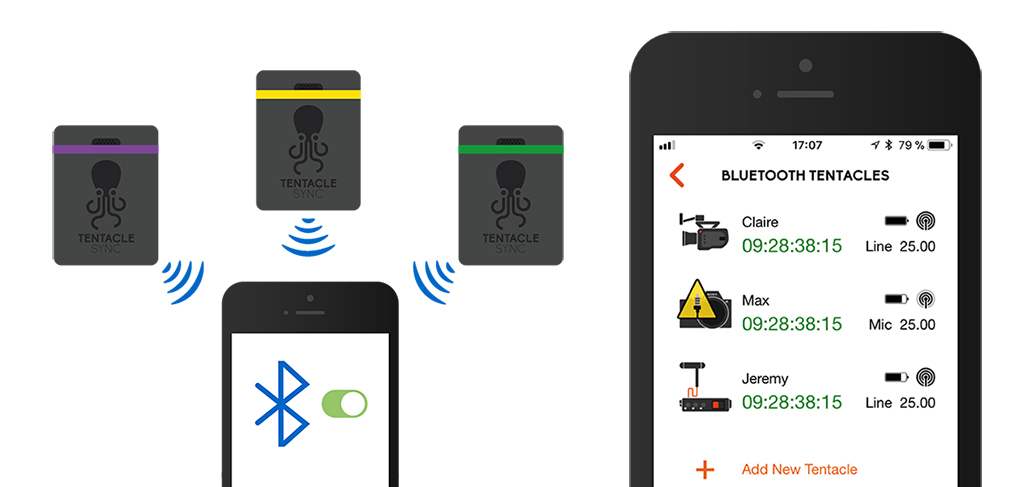
These little boxes can even become solutions that go beyond sync alone.
Tentacle’s Track E audio recorder, initially announced for May 2020 (but pushed back to summer 2020), will include an audio recorder, like a wireless transmitter pack, but recording to an SD card, with timecode that can be synced remotely. Another selling point of the Track E: audio recording will work like RAW in picture, with recording level becoming metadata that can be adjusted in post-production.
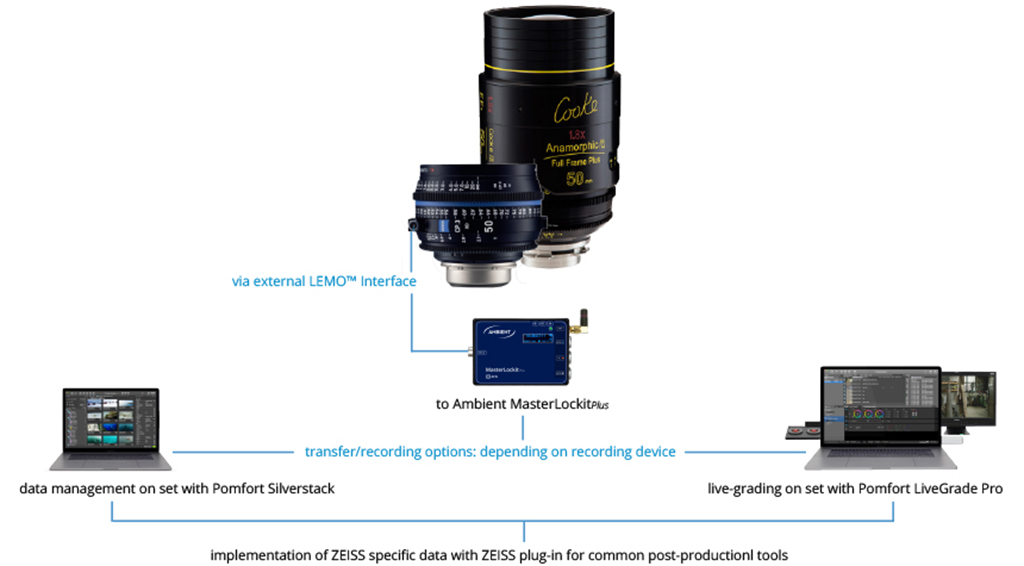
Ambient, for its part, offers integration into the camera chain with the MasterLockit Plus and a proprietary network system, ACN, which can for example capture the metadata generated by the latest Zeiss lenses (Supreme Primes and CP.3 XD) and Cooke lenses (S4/i). Lens data can then be used in Silverstack and LiveGrade Pro (Pomfort), for example, provided the camera model can record this data (VFX-friendly, right?). Ambient has also created an app, LockitScript, for camera reports.
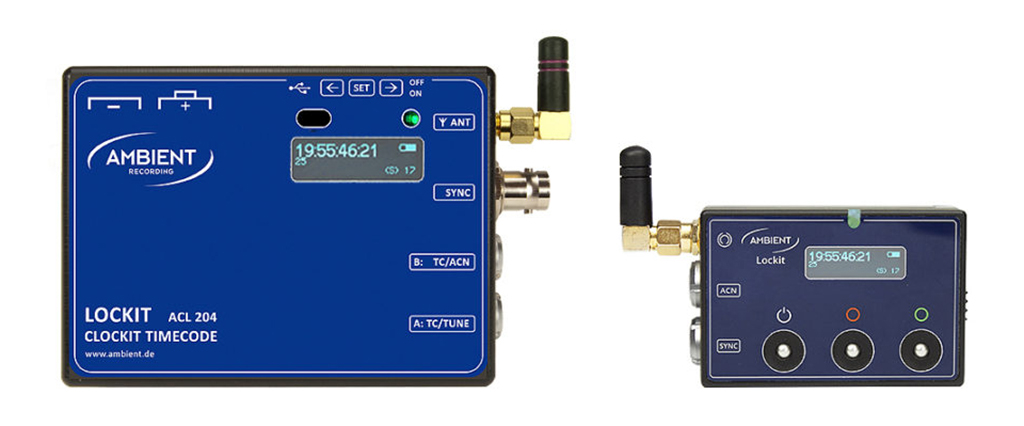
Why is it so important to have picture and sound in sync from the shoot onward?
Today there is software that can sync footage without timecode, and some editing software even has this feature built in…
Yes, but… This software isn’t infallible, and in some cases it doesn’t work, or worse, works imperfectly. Not to mention that it makes post machines crunch for hours comparing the files’ waveforms. It’s undoubtedly a nice spare tire that can come in handy, but certainly not a serious workflow.
And after that, the post-production process, like the shoot, isn’t handled by magicians, but by our post-production colleagues, who have to make do with the material we hand them.
Time for a quick aside. Today, editors have to cope with ever tighter schedules, sometimes alone, their assistants having been cut by production’s cost savings. They end up having to recommend or decide on post-production options without having been consulted beforehand. Basically, trying to make up for the absence of a post-production supervisor or coordinator. This is sometimes the case in fiction, and almost always in documentary, where shooting conditions are often the most spartan, and technical follow-through along the whole chain potentially more fragile.
From experience, I have to admit that I rarely get to meet a project’s editor, or even just talk with them. What’s more, it’s not unusual for line producers to take little interest in technical concerns… In this context, technical choices made for the shoot can end up disconnected from post-production issues, or vice versa, whereas a meeting beforehand, led by the production team and with the editor, the cinematographer, the sound mixer, and the sound editor all listening, would allow everyone to coordinate in the service of the project. It would also save time and money, and sometimes avoid a lot of hair-pulling later on, when it’s too late!
Because while the handoff from shoot to edit is critical for metadata, once editing is finished the film moves on to sound post via various OMF/AAF, XML, and EDL exports… And here again, timecode is absolutely crucial, so that what the editor sees on the timeline is also what the sound editor sees in their software. Exports are a somewhat stressful moment for editors and assistants, because there is always the risk of a slip, of a clip that is misidentified, badly exported by the editing software, and not recognized by the sound editing software.
So, once again, that famous upstream production meeting on the film’s workflow would include the cinematographer, the sound mixer, the editor, and the sound editor, right? That would make it possible to discuss formats, codecs, and more generally the tools each person uses to ensure the technical handoff from one stage to the next.
Metadata is not always universal
Every camera generates a lot of metadata, not always the same, or not always under the same names, depending on the make and model. This metadata may or may not be imported, and may or may not be interpreted correctly, depending on the editing software chosen. Or even on the version of that software.
Then, not every editing application, or the version used during the edit, is necessarily able to export the metadata the sound editor will need.
Finally, the sound editing software used by the sound post studio may interpret the metadata in the exports from the picture editing software more or less well.
Take a classic case, documentary or fiction, with 2 cameras and a dozen audio tracks: camera audio, wireless mics, boom(s), stereo ambiences. That’s quite a few tracks, and you don’t necessarily need all of them in the edit. One could imagine that a production mixdown would do, given that the separate tracks will reappear during the conform in sound editing.
On the other hand, you would obviously need to be sure that the link between the mixdown and the separate tracks, on the one hand, and between the audio tracks and the 2 cameras, on the other, isn’t broken. Otherwise everything has to be found again “by hand,” and a real headache lies ahead. Which is why (I insist) we should discuss this kind of issue before the shoot, with full knowledge of the facts…
From shoot to post: let’s talk to each other!
In short, having a common picture and sound timecode from the shoot onward has nothing but advantages:
- It guarantees that the footage is in sync in every configuration, with one camera, two or more, including of course multicam setups (as in live event recording).
- It saves everyone involved in post-production precious time.
- It’s simple to set up, and there are inexpensive solutions for both fiction and documentary.
I would even go so far as to say that the more financially fragile a project is, the more vigilant you need to be about the technical production chain, to protect yourself from stressful, time-consuming problems that are easy to avoid by thinking ahead.
To keep things concrete, and because discussions on the subject keep coming up, I thought it would be good to bring picture editors and sound editors into my modest contribution: an article that breaks down silos, for cinematographers and our post-production colleagues alike, to say that we need to consider and solve our shared problems together, starting now!
So I told Flora Alfonsi, a film editor, about my article project for the Union, and she mentioned it to Jeanne Signé, a film editor and member of the LMA (Les Monteurs Associés), who had in fact taken part in a working group on timecode. Because sync issues are often solved differently depending on the editing software used, and its version! Jeanne later published an article, notably on her personal website, offering a way to batch-sync footage automatically in Premiere (using timecode, which shows it’s even simpler and faster!), which you can find here.
Audio workflow and metadata: an exclusive document
I have also been discussing workflows for a number of years now with Éric Lesachet, sound editor and mixer at the Yellowcab studio. With great dedication, Éric took the bull by the horns and embarked on a series of tests. Adobe Premiere, FCPX, Avid Media Composer, DaVinci Resolve, AAF, EDL, XML, Pyramix, Nuendo, Pro Tools: it’s all there!
From picture and sound recording, through the most common editing software, all the way to the sound post software he uses every day, he has produced a very comprehensive, previously unpublished chart, which he has agreed to share with us exclusively, and which you can download by clicking the following link:
Whether you shoot with timecode-capable recorders or not, with cameras or DSLRs, there are solutions for staying in sync from start to finish. Read this BEFORE you shoot!! Who knows, maybe our joint initiative won’t go unheeded…
To learn more about the various equipment, here are a few links to manufacturers specializing in timecode:
- https://ambient.de/product_custom_cat/Timecode/
- https://tentaclesync.com/
- http://www.denecke.com/index.html
- https://www.timecodesystems.com/
Many thanks to Flora Alfonsi, Jeanne Signé, and Éric Lesachet for their comments and contributions.